How to share your agent's call link
Quick answer
To share your agent's call link:
- Open Agents › Deploy › Share links and choose your agent.
- Select Share…, WhatsApp, SMS or Email.
- Or download the QR code with Download PNG or Download SVG.
Every Cypher V agent has its own call link. Anyone who opens it can talk to the agent from a phone or computer, using the browser's microphone. The link is the quickest way to let colleagues try your agent, and it comes with a QR code for printed material and screens.
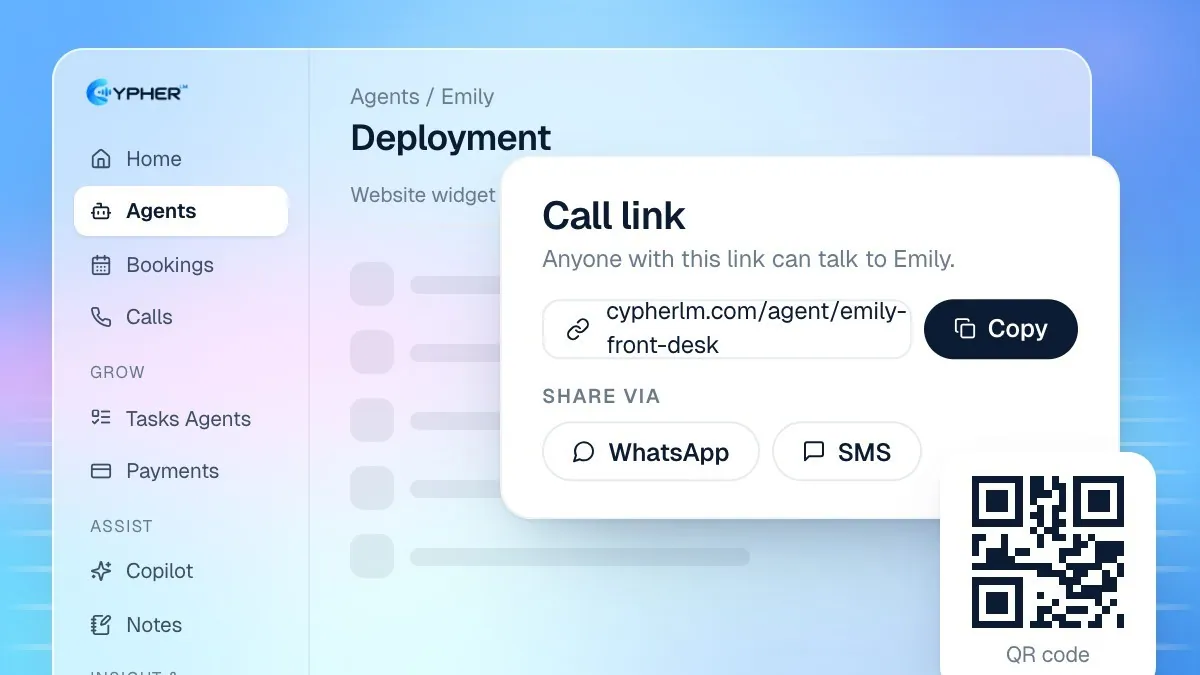
Copy or share the link
- In the dashboard sidebar, hover over Agents and select Deploy, then open the Share links tab. You can also open an agent and select Deployment › Share links.
- Choose the agent. The tab reads: Anyone with this link can talk to your agent from their phone or computer.
- Select Share… to use your device's share menu, or select WhatsApp, SMS or Email to start a message with the link already filled in.
- To copy the link without opening a message, use Copy call link in the agent's top bar, or Copy call link in the agent's menu on the Agents page.
If the agent is still being set up, the tab shows that the link starts working once the agent is live. Wait for the agent to finish building, then share it.
Download the QR code
The QR code opens the same call link when someone scans it with a phone camera.
- On the Share links tab, find the QR code next to the link.
- Select Download PNG for slides, emails and social posts, or Download SVG for print, where it stays sharp at any size.
- Test the code with your own phone before printing it.
Who can use the link today
Right now, people need a Cypher LM login to use a call link. That makes the link ideal for your own team: colleagues who review the agent, managers who want to hear it, and anyone helping you test before launch. Public call links that any customer can open without signing in are coming soon.
For customers today, use the website widget, which works for every visitor to your website with no login. See Add Cypher LM to your website. If you need customers to reach the agent by phone, see the phone numbers section of Ways to put your agent in front of customers.
A useful pattern is to share the link in your team chat with a short brief: what the agent is for, two or three questions to ask, and a request to note anything that sounded wrong. Collect the feedback in one place and fix it before launch.
Tips for useful test calls
- Ask testers to call with real questions your customers ask, not just a greeting.
- Have at least one tester speak Urdu if your agent is bilingual, and switch languages mid-call.
- Review the calls afterwards in Calls. Flag any answer that was wrong and use Teach the agent to fix it.
- Test bookings and payments end to end if those skills are switched on for the agent.
When you are happy with the results, move on to the website widget or a phone number so customers can reach the agent.